AquaIllumination Director Beta
Printed From: Utah Reefs
Category: Specialized Discussion
Forum Name: Equipment
Forum Description: This is the place to ask question about reef equipment.
URL: http://www.utahreefs.com/forum/forum_posts.asp?TID=65999
Printed Date: June 20 2026 at 10:18am
Software Version: Web Wiz Forums 12.03 - http://www.webwizforums.com
Topic: AquaIllumination Director Beta
Posted By: Ann_A
Subject: AquaIllumination Director Beta
Date Posted: August 10 2013 at 1:48pm
|
So my AI Director arrived today (I was selected to be a beta tester) in the mail, more than a month after I ordered it. I will be updating this thread with setup information, first impressions, and my overall experience as time goes by. After removing the director from the shipping box I found it was in a box similar to that of the AI Wireless Controller but simply had a different label. The Director itself was wrapped in bubble wrap and well protected. All of the accessories needed to set it up were included as well (wifi adapter, power adapter, mounting screws, and a rubber base pad), in separate plastic bags. http://s1219.photobucket.com/user/aacp123/media/IMG_2622_zps3469a4ef.jpg.html" rel="nofollow">  http://s1219.photobucket.com/user/aacp123/media/IMG_2623_zpsb0c77d37.jpg.html" rel="nofollow"> 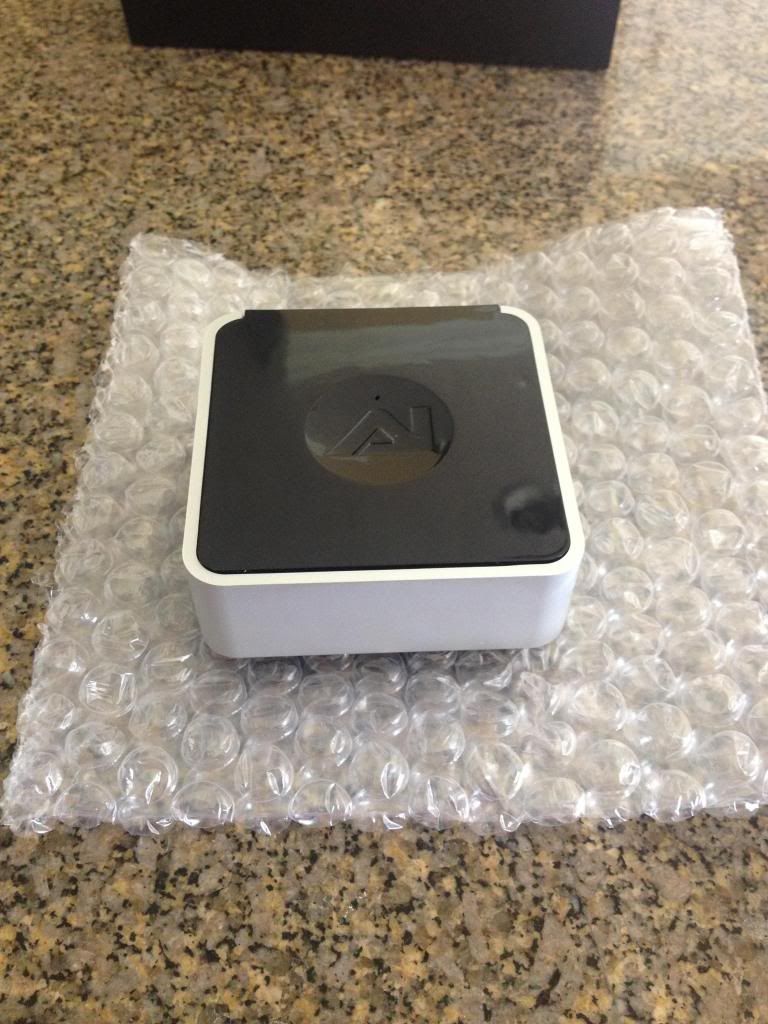 http://s1219.photobucket.com/user/aacp123/media/IMG_2624_zps78b05550.jpg.html" rel="nofollow"> 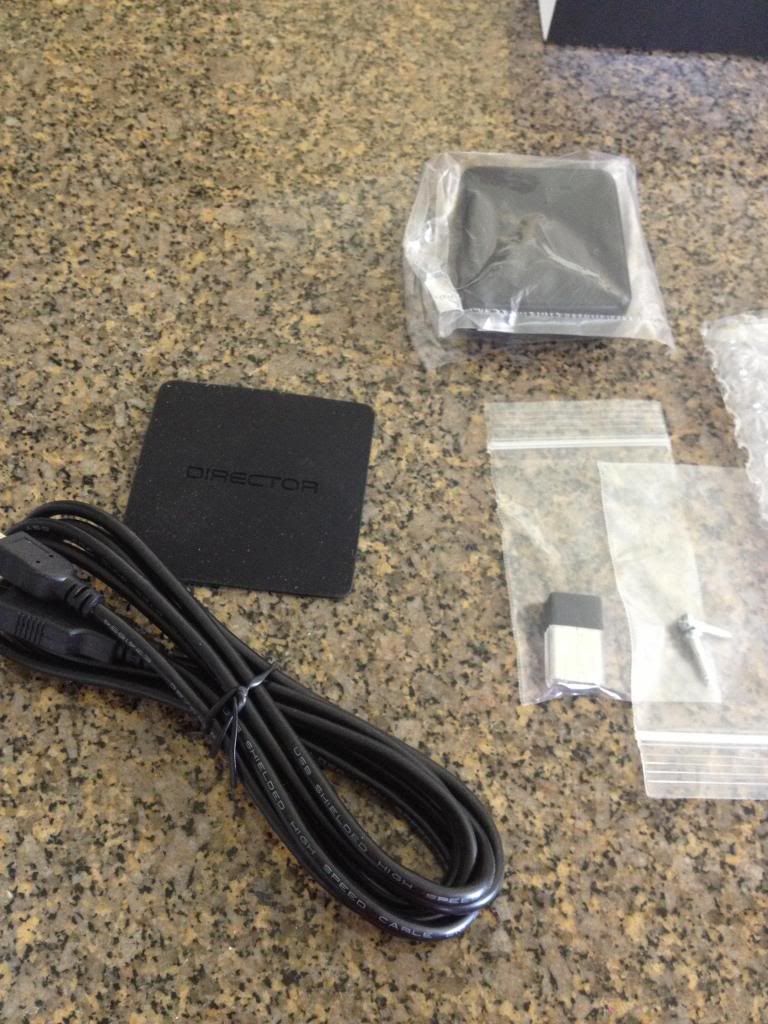 Setup was fairly straight forward (plug in the wifi adapter and power and you're halfway done), until I got to the part where I needed to connect it to my wireless network (this was due to my wireless network configuration, NOT the director). I'm running an Apple Airport Extreme Base Station which does not allow WPS connections if you're using the newer versions of Airport Utility. In order to connect the Director to my network I had to download and older version of Airport Utility (5.6.1) and connect it using the "Add Wireless Clients" feature (more on how to do this can be found in http://www.youtube.com/watch?v=MSWnvJFFZKs" rel="nofollow - this video ). After figuring out how to do that, I simply had to press the top of the Director which then entered into WPS mode and quickly connected to my network. So far I have not been able to connect my director to "MyAI" but have been able to connect to it by typing "http://director-########.local" into my browser ("########" should be replaced with the Director's serial number). The control interface is very easy to understand and use. When you first arrive at the user interface page you will see a list of your tanks (you can arrange lights by what tanks they're over as well as how they are arranged over each tank), and tabs to navigate between the Control tab, the Layout tab, and the Effects tab. http://s1219.photobucket.com/user/aacp123/media/IMG_2626_zps3e206034.jpg.html" rel="nofollow"> 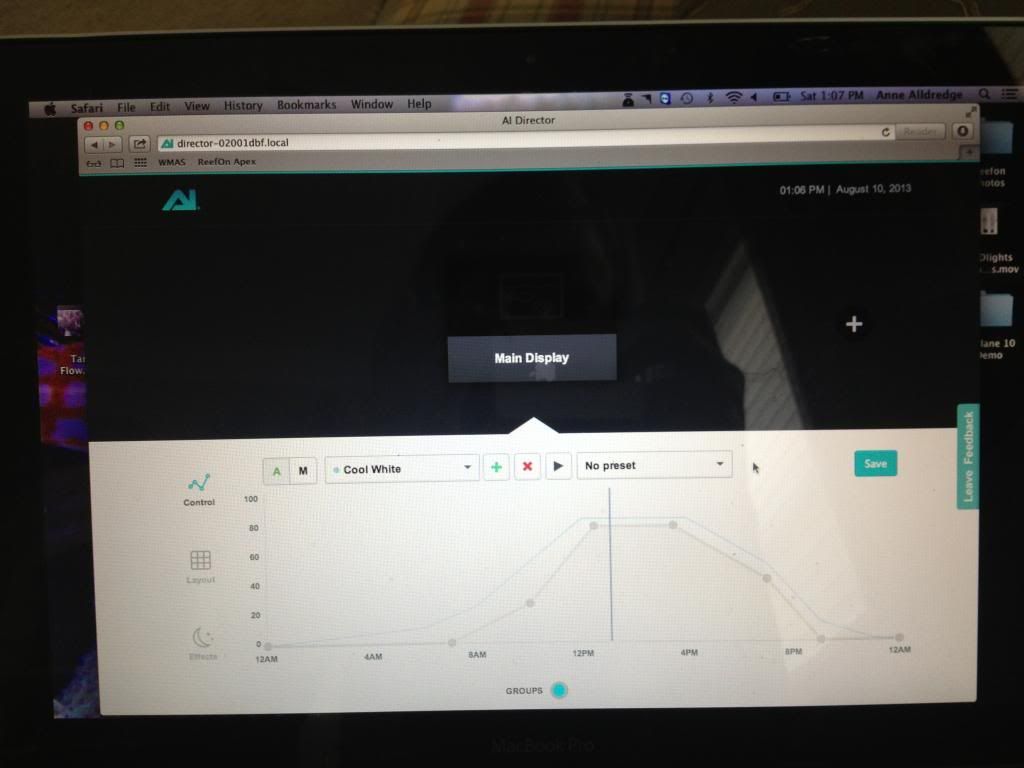 http://s1219.photobucket.com/user/aacp123/media/IMG_2628_zps5a71702b.jpg.html" rel="nofollow">  Under the Control tab you can set timers, ramp lengths, intensities, etc. for each channel (color) your fixture has. http://s1219.photobucket.com/user/aacp123/media/IMG_2627_zps0889099e.jpg.html" rel="nofollow"> 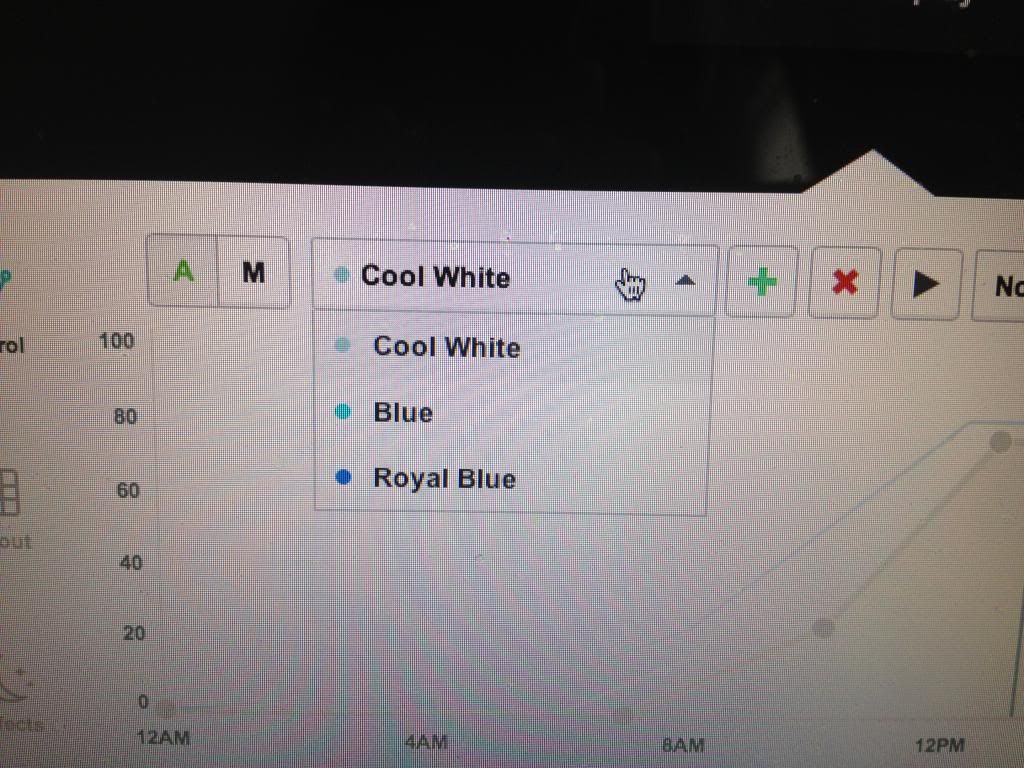 http://s1219.photobucket.com/user/aacp123/media/IMG_2629_zps426130e8.jpg.html" rel="nofollow"> 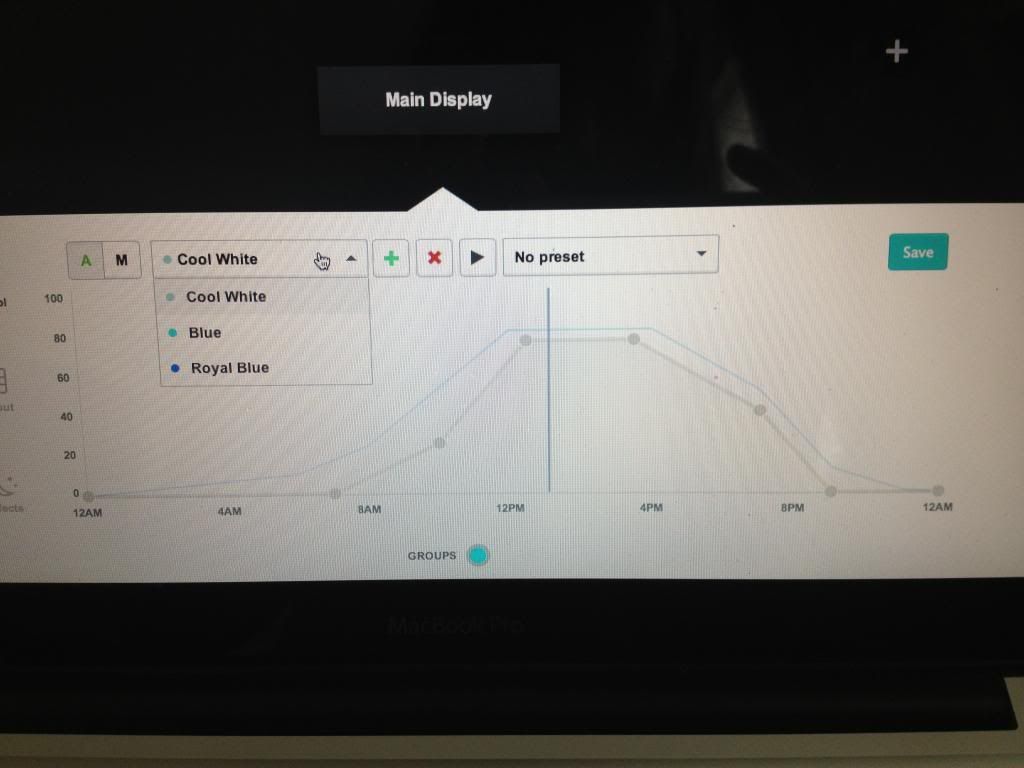 The layout tab is where you configure the layout of your lights over your tank. It is also where you connect to your lights by clicking the "Discover" button (your lights must be in pairing mode for the Director to "discover" them). http://s1219.photobucket.com/user/aacp123/media/IMG_2630_zps7988ace4.jpg.html" rel="nofollow"> 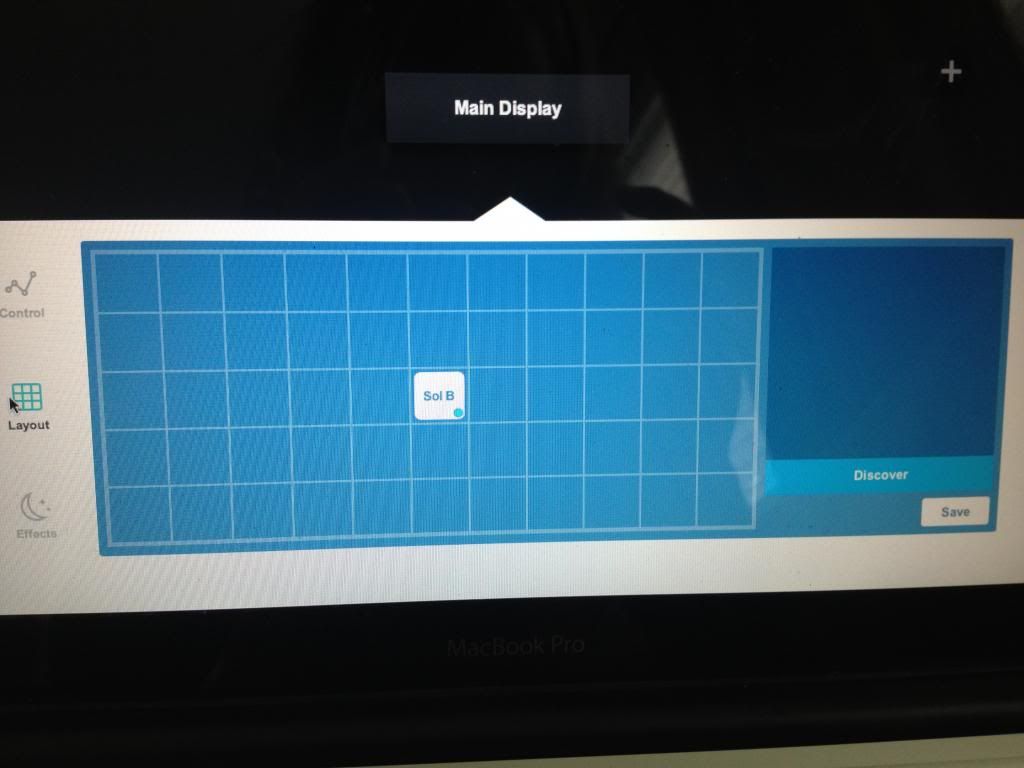 Lastly, you can control weather effects (clouds, storms, lightning), lunar cycles, and acclimation modes under the Effects tab. Here you can set the likelihood of clouds or lightning for each day as well as the intensity of each. You can configure the lunar cycle and coral acclimation modes here as well. http://s1219.photobucket.com/user/aacp123/media/IMG_2631_zps330bf8bb.jpg.html" rel="nofollow"> 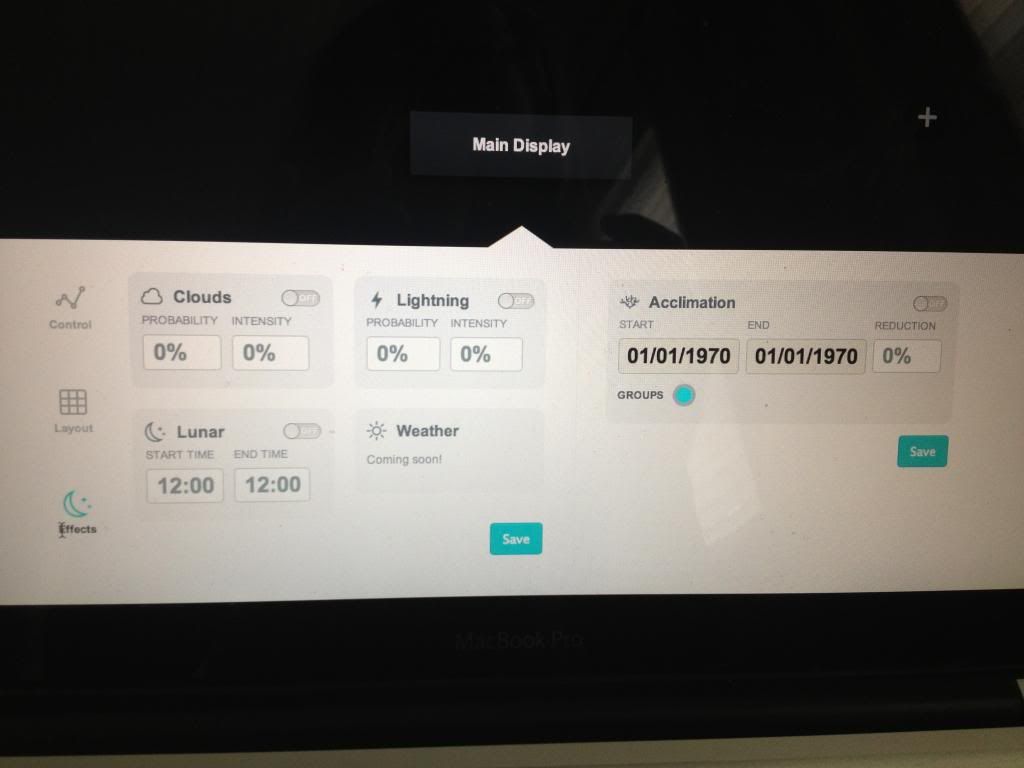 Overall I would say that AquaIllumination has finally created a superior way to control their LED lights. The interface is clean and very user-friendly, both of which are important to any control platform. I didn't like the fact that the Director does not have presets for different color temperatures/looks (14000K, 20000K, etc). The only other thing I didn't like was that I could not connect my Director to MyAI, but I'm sure AI will solve this problem with a simple software update in the near future. If you have any questions or comments feel free to post them here. I'll keep this thread updated as changes are made to the software and the program advances. ------------- http://utahreefs.com/forum/forum_posts.asp?TID=53856&title=annes-65g-rsm-reef" rel="nofollow - RSM 250 Reef |
Replies:
Posted By: Dion Richins
Date Posted: August 10 2013 at 11:46pm
|
Congrats!!! I got notice today that mine is in the po box. Need to go get it Monday!!!!!! ------------- http://www.customaquariumfurniture.com" rel="nofollow - Bad "censored" Cabinets Best quality in the valley! He is one sexy bald guy, even with out a finger!(MAC) |
Posted By: Mike Savage
Date Posted: August 11 2013 at 9:34am
|
I guess I signed up late. I haven't heard a word. -------------  |
Posted By: Ann_A
Date Posted: August 11 2013 at 9:55am
|
Dion - You'll love it! It's a great tool for use with these LEDs. Let me know how yours works out for you, and especially whether or not you're able to connect to the online server, at MyAI. Mike - There were a ton of people who signed up and weren't selected, regardless of when they signed up. It shouldn't be too much longer until these are released to everyone. ------------- http://utahreefs.com/forum/forum_posts.asp?TID=53856&title=annes-65g-rsm-reef" rel="nofollow - RSM 250 Reef |
Posted By: Mike Savage
Date Posted: August 11 2013 at 1:02pm
|
From what I have been reading they still need a bit of work to be ready for release though people seldom brag about what is working properly so who knows. ------------- |
Posted By: Dion Richins
Date Posted: August 11 2013 at 8:17pm
|
IT will be interesting Mike. They were supposed to be out to the public months ago. I said something to one of their dealers and they were surprised to see that we had these already. I'm hoping to have my tank running with lights this next weekend in preparation of moving my existing 150 into it. ------------- http://www.customaquariumfurniture.com" rel="nofollow - Bad "censored" Cabinets Best quality in the valley! He is one sexy bald guy, even with out a finger!(MAC) |
Posted By: Moosetang
Date Posted: August 11 2013 at 8:46pm
| I've also heard its months out for the general public. I am very excited to get my hands one when it releases!! |
Posted By: Ann_A
Date Posted: August 14 2013 at 11:00am
|
So far the only problem I've had with it (besides the part about connecting it to my network being tricky) is that the graph for the blue does not show up unless I have selected the blues under the color selection menu for setting timers. Everything else works pretty well though the "play timers" feature is a little rough and doesn't flow through the timers too smoothly. ------------- http://utahreefs.com/forum/forum_posts.asp?TID=53856&title=annes-65g-rsm-reef" rel="nofollow - RSM 250 Reef |
Posted By: Mike Savage
Date Posted: August 24 2013 at 3:56pm
|
I just got notification that mine will be delivered Monday! ------------- |
Posted By: Ann_A
Date Posted: September 10 2013 at 9:38am
|
Alright so the director has been working great, I just can't get it to connect to MyAI. Have any of your other beta testers been able to connect yours? ------------- http://utahreefs.com/forum/forum_posts.asp?TID=53856&title=annes-65g-rsm-reef" rel="nofollow - RSM 250 Reef |
Posted By: Mike Savage
Date Posted: September 10 2013 at 8:03pm
|
No, it is quite frustrating. Today my lights didn't come on. Up until today the lights were working but I couldn't get changes in lighting to work. It always kept going back to my original (test) program. I've tried wireless and direct and my computer does recognize it. I just can't connect to My AI. Maybe they are pushing the update they've been talking about.
Mike ------------- |
Posted By: Dion Richins
Date Posted: September 10 2013 at 11:53pm
|
I haven't set mine up yet. Ive had so much to do on the system otherwise. I'm hoping to be set up this weekend but with the issues I'm seeing all over I'm not so sure... ------------- http://www.customaquariumfurniture.com" rel="nofollow - Bad "censored" Cabinets Best quality in the valley! He is one sexy bald guy, even with out a finger!(MAC) |
Posted By: Moosetang
Date Posted: September 11 2013 at 7:31pm
| Just set up my Director. Set up was very simple and seems to be running good so far. I am able to connect to MyAI by the way. Defiantly can tell its a Beta though. |
Posted By: builderofdreams
Date Posted: September 12 2013 at 10:13am
|
Ann How are the corals responding to the lighting change? ------------- It's Not a Hobby It's an Obsession 150&210 Gallons of Madness and. Sanity! 801-850-4915 http://www.utahreefs.com/forum/forum_posts.asp?TID=65135&title=builderofdreams-feedback-post |
Posted By: jrsavs21
Date Posted: September 12 2013 at 11:25am
|
They have updated the UI a little bit since this was originally posted. This is what it currently looks like with a Hydra: 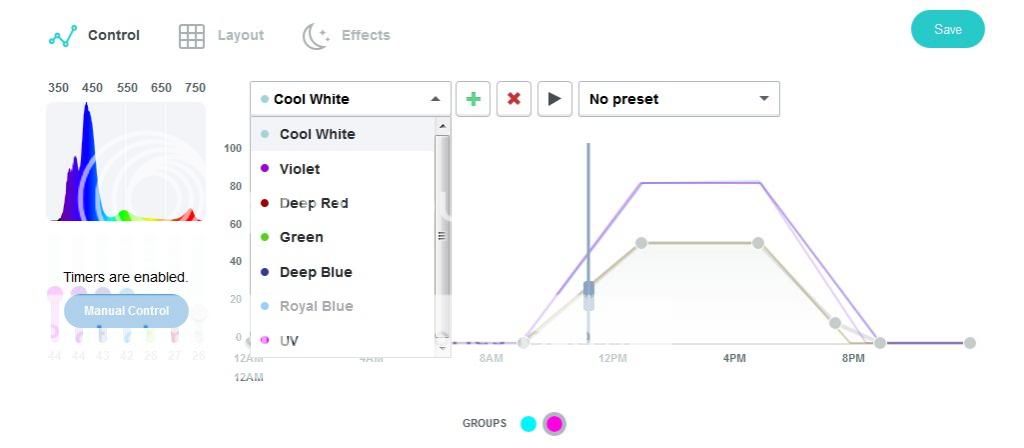 You can now see what intensity the lights are currently at for each color. If you switch it to manual you can move the sliders up and down on the same screen. There is suppose to be a new update this week...so it might change again  |
Posted By: Moosetang
Date Posted: September 12 2013 at 12:07pm
| How does it update? And what is the latest version so I can check where I'm at? |
Posted By: jrsavs21
Date Posted: September 12 2013 at 12:19pm
|
It currently auto updates if you have it connected to the internet(This sucks if it breaks something) The next update is suppose to change it to a manual process. The current versions are: ai-controller : 1.0.249-r0 ai-director : 1.0.2-r2 ai-log : 1.0.21-r0 ai-monitor : 1.0.16-r1 ai-serial-number-fetcher : 1.0.13-r0 ai-serial-server : 1.0.53-r0 ai-tunnel : 1.0.108-r0 ai-web-root : 1.0.59-r11 ai-web-server : 1.0.333-r0 This is the email they sent out earlier this week:
|
 Greetings Beta users,
Posted By: Ann_A
Date Posted: September 12 2013 at 12:43pm
|
The corals were doing great and started coloring up even better when I first added the lights a few months ago. However I recently had a problem with my phosphates and biopellet reactor (RO was adding phosphates and biopellets were feeding cyano) and lost quite a few pieces. Almost everything else faded. However after only a few days of having the chemistry back under control and being free of cyano, the corals are starting to color back up and are growing again. I haven't gotten any updates. Do you have to have the Director connected to MyAI to receive them? ------------- http://utahreefs.com/forum/forum_posts.asp?TID=53856&title=annes-65g-rsm-reef" rel="nofollow - RSM 250 Reef |
Posted By: jrsavs21
Date Posted: September 12 2013 at 1:22pm
|
I'm not sure if that is required, mine is just plugged into my router and it updates whenever they push one out. I do have my account set up at: https://my.aquaillumination.com/login.html" rel="nofollow - https://my.aquaillumination.com/login.html |
Posted By: Moosetang
Date Posted: September 12 2013 at 1:42pm
| How do I get on the Beta mailing list? |
Posted By: jrsavs21
Date Posted: September 12 2013 at 1:47pm
|
I am signed up for both the above linked site, and the beta site at: http://aidirector-beta.betaeasy.com/" rel="nofollow - http://aidirector-beta.betaeasy.com/ I am not sure which one put me on the list, but I would guess it was the beta site one. |
Posted By: Ann_A
Date Posted: September 12 2013 at 3:25pm
I have very different numbers, probably the original software because some of the numbers (software versions I assume) are lower. ai-controller: 1.0.228-r0 ai-director: 1.0.2-r2 ai-log: 1.0.21-r0 ai-monitor: 1.0.14-r1 ai-serial-number-fetcher: 1.0.13-r0 ai-serial-server: 1.0.53-r0 ai-tunnel: 1.0.106-r0 ai-web-server: 1.0.324-r0 You'll also that the "ai-web-root" is completely absent on mine. ------------- http://utahreefs.com/forum/forum_posts.asp?TID=53856&title=annes-65g-rsm-reef" rel="nofollow - RSM 250 Reef |
Posted By: Mike Savage
Date Posted: September 12 2013 at 5:18pm
http://aidirector-beta.betaeasy.com/
then click on "sign up" ------------- |
Posted By: Mike Savage
Date Posted: September 12 2013 at 5:19pm
|
Mine is working great now but I have to use Chrome. The site quit working for me with IE and I don't want to clear cookies right now. ------------- |
Posted By: Ann_A
Date Posted: September 12 2013 at 5:40pm
|
Mike, did you get it to connect to MyAI? I tried clearing cookies, history, and all other browsing data. It still won't connect. I keep getting a message saying "A Director with serial number XXXXXXXX is not connected to MyAI. Please connect to MyAI and try again." The problem is that I'm trying to connect it and it's telling me that I need to connect it in order to connect it. It doesn't make any sense. ------------- http://utahreefs.com/forum/forum_posts.asp?TID=53856&title=annes-65g-rsm-reef" rel="nofollow - RSM 250 Reef |
Posted By: Mike Savage
Date Posted: September 12 2013 at 6:45pm
|
Yes I did. I changed from Wireless to wired, cut the power, and went through the setup like new. It still won't work for me with Internet Explorer 10 though. With Chrome it comes right up. ------------- |
Posted By: jrsavs21
Date Posted: September 13 2013 at 11:44am
Got this email today, the new update should be out tomorrow.
|
Posted By: Ann_A
Date Posted: September 13 2013 at 12:30pm
|
I got the same email, but I can't get the update if my Director isn't connected to MyAI. I've emailed AI, posted on the beta forum, and sent a facebook message to AI. I have only received a response from the facebook message, telling me to submit a request with their support website, which I have already done. I think I will call them if I don't hear back within a few hours. ------------- http://utahreefs.com/forum/forum_posts.asp?TID=53856&title=annes-65g-rsm-reef" rel="nofollow - RSM 250 Reef |
Posted By: Krazie4Acans
Date Posted: September 13 2013 at 12:59pm
|
Anne did you try Chrome or Firefox instead of IE?
------------- My ocean. 90g (yup, won it!), 40g, 28g, & 10g Systems PADI Advanced Open Water http://utahreefs.com/forum/forum_posts.asp?TID=63568&title=krazies-nano-paradise" rel="nofollow - Tank Thread: |
Posted By: Ann_A
Date Posted: September 13 2013 at 2:48pm
|
I'm using Safari, but I have tried Chrome, Firefox, and IE. ------------- http://utahreefs.com/forum/forum_posts.asp?TID=53856&title=annes-65g-rsm-reef" rel="nofollow - RSM 250 Reef |
Posted By: Moosetang
Date Posted: September 14 2013 at 1:37pm
| What is the current version at this point? Does anyone know? Just want to see if my Director had updated. |
Posted By: Mike Savage
Date Posted: September 14 2013 at 1:39pm
Mine updated:
------------- |
Posted By: Ann_A
Date Posted: September 14 2013 at 2:34pm
|
My Director stopped responding to my computer so I did a full factory reset and have reconnected it to my network. I still has not been updated and it won't connect to MyAI. I have not heard anything back from AI for a while. ------------- http://utahreefs.com/forum/forum_posts.asp?TID=53856&title=annes-65g-rsm-reef" rel="nofollow - RSM 250 Reef |
Posted By: Ann_A
Date Posted: September 15 2013 at 9:07am
|
Has anyone been able to connect their director to MyAI using the wifi setup? ------------- http://utahreefs.com/forum/forum_posts.asp?TID=53856&title=annes-65g-rsm-reef" rel="nofollow - RSM 250 Reef |
Posted By: Moosetang
Date Posted: September 15 2013 at 12:46pm
Mine has all connected up through wifi just fine. Through MyAI and everything. I didn't do anything different than what the instructions told me to do. |
Posted By: Mike Savage
Date Posted: September 15 2013 at 1:32pm
|
I had mine on wireless a couple of weeks ago then when I started having problems I wired it. ------------- |
Posted By: Dion Richins
Date Posted: September 15 2013 at 2:42pm
|
I cant even get it to log on wired or wireless. ------------- http://www.customaquariumfurniture.com" rel="nofollow - Bad "censored" Cabinets Best quality in the valley! He is one sexy bald guy, even with out a finger!(MAC) |
Posted By: Moosetang
Date Posted: September 17 2013 at 5:07pm
| As of about 5 minutes ago my Director has lost connection and will not respond to any actions. No longer will connect. Any ideas? |
Posted By: Ann_A
Date Posted: September 17 2013 at 5:42pm
|
Have you tried a hard reset? Power cycle it? ------------- http://utahreefs.com/forum/forum_posts.asp?TID=53856&title=annes-65g-rsm-reef" rel="nofollow - RSM 250 Reef |
Posted By: Mike Savage
Date Posted: September 17 2013 at 6:01pm
|
I agree with Ann. ------------- |
Posted By: Moosetang
Date Posted: September 17 2013 at 9:06pm
| I did. Got it back going but had to re-program everything. |
Posted By: Moosetang
Date Posted: September 17 2013 at 10:48pm
| After all that (I figured I'd have to re-program everything) everything seems to be working smoother and responding faster. I hope everyone else is having luck as well! |
Posted By: Ann_A
Date Posted: September 18 2013 at 7:43am
|
I've been talking to AI for days now and have not been able to connect to MyAI. I'm probably going to completely delete and rebuild my wifi network and if that doesn't work I bet I'll have to get a new director. ------------- http://utahreefs.com/forum/forum_posts.asp?TID=53856&title=annes-65g-rsm-reef" rel="nofollow - RSM 250 Reef |
Posted By: Ann_A
Date Posted: September 24 2013 at 2:56pm
|
After deleting and redoing my entire wifi network, the problem has not changed. I have not heard back from AI for a while now, and when I checked the support request on their website today, it was "deemed solved" even though it clearly was not. I have left a comment about this, but based on my experience this far, I don't expect to hear anything for awhile, if ever. I will say, this is the first time I have had a negative experience with AI, and it has been very disappointing to say the least.
If anyone on here has any ideas to fix the problem, please let me know. I could use all the help I can get. ------------- http://utahreefs.com/forum/forum_posts.asp?TID=53856&title=annes-65g-rsm-reef" rel="nofollow - RSM 250 Reef |
Posted By: Mike Savage
Date Posted: September 24 2013 at 4:06pm
|
I can't connect to mine either right now. I have been too busy to even worry about it though. Fortunately the lights are working like normal. ------------- |
Posted By: Ann_A
Date Posted: September 27 2013 at 11:29pm
|
Finally!!! After spending around 6 hours reprogramming every last byte of my network, I was able to open the necessary ports for the director. I'm now running the following:
------------- http://utahreefs.com/forum/forum_posts.asp?TID=53856&title=annes-65g-rsm-reef" rel="nofollow - RSM 250 Reef |
Posted By: Moosetang
Date Posted: October 27 2013 at 12:57pm
| Just curious to see how people are doing out there. What versions you all are running on. I'm having issues try to reconnect to my network. My Director dropped connection and wont find my network. So bummed! |
Posted By: Mike Savage
Date Posted: October 27 2013 at 4:18pm
|
I have horrible luck with IE but with Chrome it seems to do well. ------------- |
Posted By: Ann_A
Date Posted: October 28 2013 at 4:46pm
|
I haven't really had any problems for awhile now. Here's what I'm running... ai-connman: 1.0.24-r0 ai-controller: 1.0.279-r0 ai-director: 1.0.17-r16 ai-firmware: 1.0.1-r0 ai-log: 1.0.21-r0 ai-monitor: 1.0.19-r2 ai-serial-number-fetcher: 1.0.14-r0 ai-serial-server: 1.0.54-r0 ai-tunnel: 1.0.114-r0 ai-web-root: 1.0.103-r12 ai-web-server: 1.0.350-r0 ------------- http://utahreefs.com/forum/forum_posts.asp?TID=53856&title=annes-65g-rsm-reef" rel="nofollow - RSM 250 Reef |